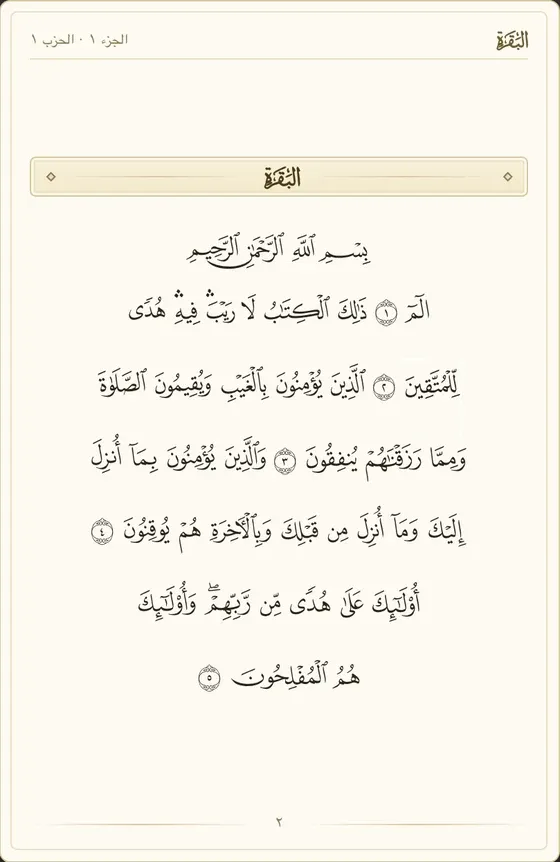
Online Quran teaching software gives a teacher and student a shared Mushaf during a live lesson. Halqora synchronizes the teacher’s page and verse selection on a 604-page Madinah Mushaf, with a tajweed colouring toggle and English translations.
Halqora is our product. We’ve tried to keep this comparison fair: competitor details come from their public pages, linked and dated below. Tell us if anything is out of date at support@halqora.com.
Product details and public-page comparisons below are current as of 21 October 2026.
What is a Quran classroom?
Halqora is management software for online academies and tutoring businesses that run one-to-one live classes, from languages and music to test prep and Quran. The Mushaf viewer is one of the classroom’s teaching tools, alongside video, a shared whiteboard, screen sharing and a PDF library. The classroom supports one teacher and one student.
The shared page gives the lesson a clear reference. The teacher selects verses, and the student sees the selection without having to find the passage from a spoken page number. Students can still explore another page without moving the teacher’s view.
For how Quran academies use the wider scheduling, billing and payroll workflow, see Halqora for Quran academies. Our guide to tools to teach Quran online covers the classroom tools around the lesson.
How it works
- Open the Mushaf viewer inside a Halqora class. The Madinah layout uses Quran text and page fonts from Quran Foundation (Quran.com).
- Turn to a page or select verses. The student’s view follows the teacher’s page, selection, view settings and scroll position.
- Let the student browse locally when needed. The student presses “Back to teacher’s view” to return to the shared position.
- Toggle tajweed colouring on or off. The toggle is shared, so the lesson uses the same display setting.
- Show an English translation. The available options covered here are Rowwad Translation Center · QuranEnc.com and Pickthall.
- Switch to the whiteboard or an academy-uploaded PDF, such as a Qaida you have rights to use. PDF pages sync, and annotation works on PDFs and screen shares.
- Record the outcome after class. For a completed lesson, the teacher submits a rating and written feedback for the admin.
Lesson reports are internal. Families cannot see the reports, and payroll for the period waits until completed-class reports are in.
For letter practice, the guide to teaching Noorani Qaida online explains the teaching context for using a shared page and whiteboard.
Following the teacher’s page without losing your place
The Mushaf viewer separates following from local browsing. During recitation, the teacher controls the shared reference. When the student navigates away, the teacher’s page stays where the teacher left it.
The return control makes the distinction visible. Ask the student to press “Back to teacher’s view” before continuing together. You can then refer to the same selected passage without asking the student to retrace the browsing path.
Screen-sharing a PDF follows the presenter’s screen. Halqora’s Mushaf viewer adds independent browsing and a return control for the student.
Quran tools in Halqora, QuranSuite, Nahjuna, MaktabMate and a shared-screen PDF
The comparison reflects the supplied public-page checks dated 21 October 2026. “Not stated on checked page” means the source does not establish the feature. The PDF column describes sharing a document in Zoom/Meet, rather than auditing either meeting service.
| Tool or price unit | Halqora | QuranSuite | Nahjuna | MaktabMate | Screen-sharing a PDF Mushaf in Zoom/Meet |
|---|---|---|---|---|---|
| Mushaf in live class | Built-in viewer | Says Mushaf and Qaida are on the call | Lists Interactive Quran Viewer | not stated on checked page | Presenter shares document |
| Follow-the-teacher sync | Page, selection and scroll | not stated on checked page | not stated on checked page | not stated on checked page | Follows shared screen |
| Tajweed colour toggle | Shared on/off toggle | not stated on checked page | not stated on checked page | not stated on checked page | Depends on document |
| Translations | Rowwad and Pickthall; English | not stated on checked page | not stated on checked page | not stated on checked page | Depends on document |
| Hifz tracking | No structured module | not stated on checked page | not stated on checked page | Describes juz-by-juz records | Depends on separate records |
| Recording | No | not stated on checked page | not stated on checked page | not stated on checked page | not stated on checked page |
| Public price (per month) | Academy: USD 2.50 per active student; USD 99 minimum | not stated on checked page | not stated on checked page | Says from GBP 9.99 | not stated on checked page |
Halqora’s Academy price above is current as of October 2026. See Halqora pricing for the plan details.
Tajweed colours and translations: what is included
Halqora provides tajweed colouring as a shared display option. Color schemes vary by publisher, so do not assume the viewer matches the key in a student’s printed Mushaf. Check the display together before using colors as lesson references.
The viewer uses the Madinah layout in Hafs. English translations are credited to Rowwad Translation Center · QuranEnc.com and Pickthall. Halqora does not present the Quran text or translations as its own work.
The guide to a tajweed colour-coded Mushaf online gives more context for choosing a shared reading display.
What it doesn’t do (yet)
Annotation works over PDF pages and screen shares, not over the Quran viewer. Chat stays closed until an admin opens it. A student needs the teacher’s permission to share a screen.
Alternatives and how others handle this
QuranSuite says its classroom includes a Mushaf and Qaida. Its live-class listening description says parents may listen when permitted. QuranSuite merits a closer look if parent listening is central to your workflow; Halqora’s observation feature is for admins.
MaktabMate is worth considering when structured memorization records matter more than a synced classroom. MaktabMate describes sabaq, sabqi and manzil tracking, which Halqora does not provide.
Nahjuna lists an Interactive Quran Viewer, and its App Store description describes digital Mushaf mistake marking. Those descriptions establish a different teaching workflow; they do not establish the sync behavior left unstated in the table.
Sources
- Quran.com API: final verse page number, checked 21 October 2026
- QuranSuite homepage, checked 21 October 2026
- QuranSuite features, checked 21 October 2026
- Nahjuna feature overview, checked 21 October 2026
- Nahjuna App Store listing, checked 21 October 2026
- MaktabMate features and pricing, checked 21 October 2026